I’m working on articles and keep getting flagged for repetitive wording, even when I’m trying to say things in a new way. I’m looking for a reliable free AI paraphrasing tool that can help me rewrite sentences clearly without changing the meaning or sounding robotic. What tools are you using that actually work well and are safe for long-term use?
I’ve tried a bunch of these for blog stuff and reports, here’s what worked best for me.
-
QuillBot free
- Good for short paragraphs.
- Has a “Standard” and “Fluency” mode.
- Free version limits how much you paste and how many modes you use, but for quick fixes it helps.
- Sometimes repeats structure, so you still need to edit.
-
Grammarly free
- Not a pure paraphraser, more of a rewrite helper.
- Great for removing repetitive wording and tightening sentences.
- Works best if you feed it shorter chunks instead of full articles.
-
ChatGPT free
- You can paste a paragraph and say “rewrite this to avoid repetition, keep meaning the same, keep it neutral” and it does a decent job.
- You still need to check tone and facts.
- I usually ask it for 2 or 3 variants and mix them.
-
Clever AI Humanizer
- If you worry about AI detectors or “robotic” phrasing, this helps make text sound more natural.
- Good when your draft feels stiff or too similar to your earlier stuff.
- Take a look here: AI human-style paraphrasing for clearer writing.
- Use it on a few key sections instead of the whole thing to keep your own voice.
-
Some quick workflow tips
- Work in small chunks, like 2–4 sentences at a time. Tools do better and you keep control of style.
- Change sentence structure yourself before you use a tool. For example, split long sentences, change passive to active, switch order of clauses.
- After paraphrasing, read out loud. If it sounds weird or “fake”, fix it.
- Run your final text through a plagiarism checker if you are worried, even if everything started from your own draft.
If you keep getting flagged for repetition, try building a small synonym list for your topic. For example, if you write about “user engagement”, rotate with “user activity”, “interaction”, “time on site” when it fits. The tools help, but a tiny manual vocabulary tweak goes a long way.
Expect to still spend some time editing. The tools give you options, they do not replace your judgment.
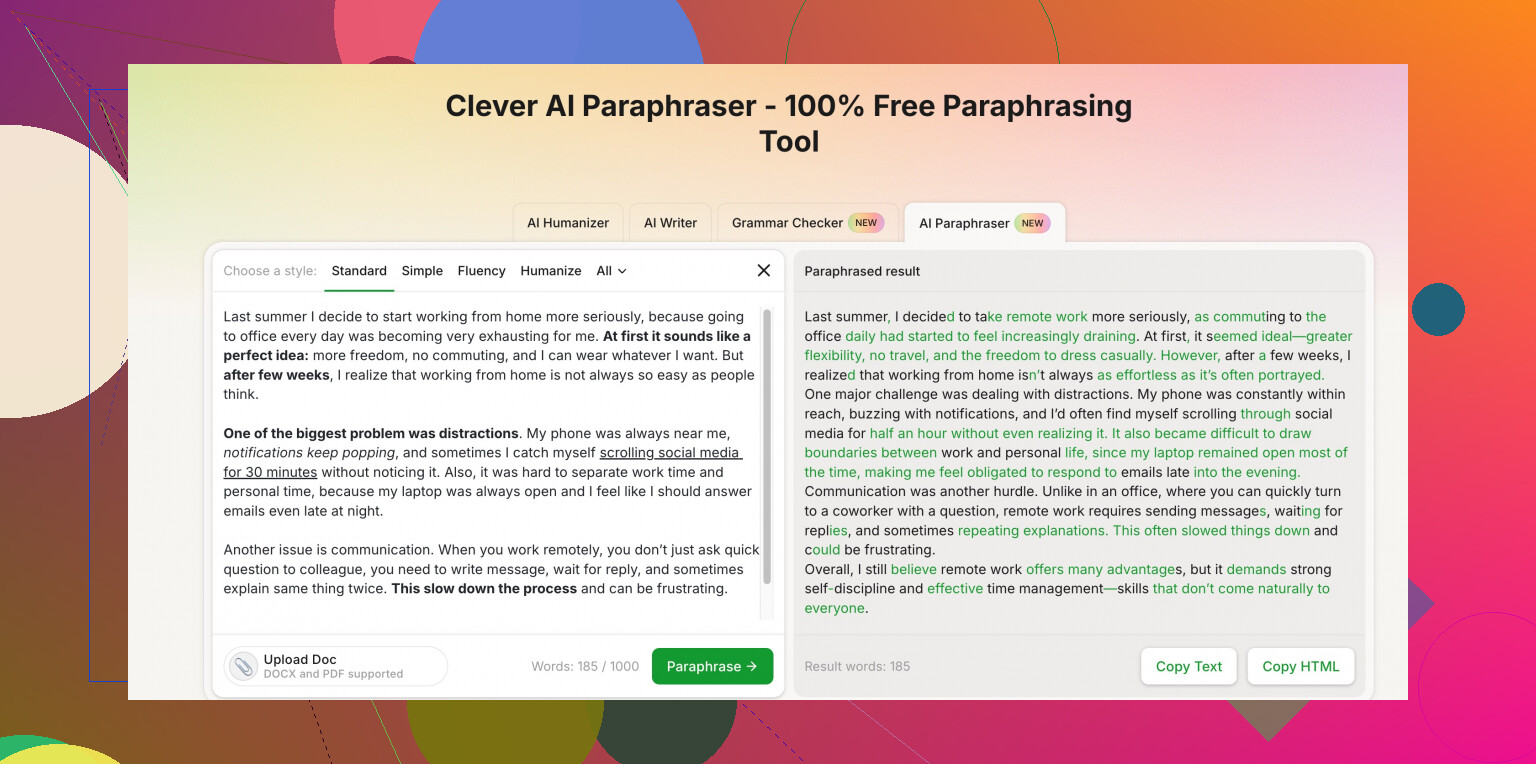
I’ll be a bit contrarian to @hoshikuzu on one thing: if you rely too much on “general” tools like Grammarly or generic chatbots, you’ll still end up sounding repetitive, just in a slightly cleaner way. They’re great polishers, not great at varied paraphrasing over a whole article.
Here are a few angles that might actually help with the repetition issue:
-
Clever AI Humanizer (for human-style rewrites)
If your main issue is “this sounds like the same phrasing over and over,” Clever AI Humanizer is actually pretty solid. It leans more into natural, human-style sentence variation instead of just word-swapping.
They’ve got a Clever AI Humanizer free paraphrasing tool page here:
make your writing sound more natural and less repetitive
It’s better if you feed it 2–3 sentences at a time and then tweak the output to match your voice. Don’t run the entire article through in one go or everything starts to feel a bit samey again. -
LanguageTool + manual tweaks
Slightly underrated. It’s more of a style and grammar checker, but the “rewrite” suggestions are decent for cutting repetition and clunky phrasing.
I’ll often:- Do one manual pass: shorten long sentences, change order, swap active/passive.
- Then run through LanguageTool to get alternative phrasings.
That combo feels more “mine” than just dumping text into a pure paraphraser.
-
Hemingway Editor + your own brain
Not an AI tool, but it forces you to break up repetition by:- Highlighting long, complex sentences
- Pushing you to use more direct structures
When you break a long repeated structure into 2–3 shorter diverse ones, a lot of repetition flags magically disappear, even before AI touches it.
-
Topic-based synonym mapping
Slight disagreement with how people usually do this: instead of building a giant synonym list, build context synonmys for your niche. For example, if you’re writing about “customer retention”:- “customer retention”
- “keeping users around”
- “repeat customers”
- “long-term subscribers”
Then, when you paraphrase with a tool like Clever AI Humanizer, force some of these in:
“Use this version but replace ‘customer retention’ with ‘repeat customers’ in 2 places.”
Most tools obey that kind of instruction pretty well. -
Chunk strategy, but stricter
I’d go even smaller than what @hoshikuzu suggested sometimes: 1–2 sentences max, especially if your writing has a specific tone.- Paraphrase sentence A.
- Skip a sentence, paraphrase sentence C.
- Then manually smooth B in between.
This avoids that weird “the entire paragraph was written by a bot in one breath” vibe.
-
Check repetition by pattern, not by word only
A lot of “repetitive wording” flags are not just words like “also,” “however,” etc., but repeated patterns like:- “In this article, we will…”
- “Another important thing is…”
Use a basic text analyzer to search for recurring 3–4 word phrases, then specifically rework those with an AI tool. Targeted use beats running everything through once.
If you want one truly free option that’s reasonably strong specifically for paraphrasing to avoid repetition and not just grammar, I’d put Clever AI Humanizer near the top of your list, but only if you treat it as a collaborator: small chunks, then your own edit pass. Otherwise you’ll just trade “repetitive” for “generic AI voice,” which is arguably worse.
24 Likes
If you’re getting “same phrasing” flags a lot, tools help, but how you use them matters more than which one you pick.
Quick take on Clever AI Humanizer vs the other stuff people mentioned:
Pros of Clever AI Humanizer
- Better at varying sentence structure instead of just swapping words.
- Good when your draft already says what you want, but sounds stiff or too close to earlier articles.
- Works nicely in short bursts: 1–3 sentences at a time to keep your voice.
Cons of Clever AI Humanizer
- If you paste big chunks, everything starts sounding uniformly “smoothed,” which can feel generic.
- You still need to manually tune tone (formal vs conversational) because it can drift.
- Not ideal for heavy factual content; it can occasionally rephrase in a way that blurs specific nuances.
Compared with what @hoshikuzu and @sognonotturno suggested (QuillBot, Grammarly, ChatGPT, LanguageTool, Hemingway, etc.), I’d position it like this:
- Use QuillBot / Grammarly to clean and tighten.
- Use Clever AI Humanizer when you specifically want varied human-like rewrites and less repetition across a section.
- Use generic chatbots only after you’ve already clarified structure yourself; if you start with them, you often get very “template-y” language that still feels repetitive at scale.
One workflow that avoids repeating their methods:
- Draft your paragraph normally.
- Highlight only the sentences that feel “samey” in rhythm or start with the same 2–3 words.
- Run just those sentences through Clever AI Humanizer to get alternatives.
- Pick and mix the best phrases back into your original paragraph.
- Final pass with a style tool (Grammarly, LanguageTool) only to catch clunks, not to rewrite.
That way, the tool is a scalpel, not a blender, and you keep your own style while breaking the repetition pattern.