I’ve been testing GPTinf Humanizer for rewriting and making AI content sound more natural, but I’m not sure if it’s actually helping with detection tools or just changing wording. Can anyone share real results, pros and cons, or issues you’ve run into with GPTinf Humanizer so I know if it’s worth relying on for long-term content and SEO work?
GPTinf Humanizer Review: What Happened When I Pushed It
My test with GPTinf vs what the homepage promises
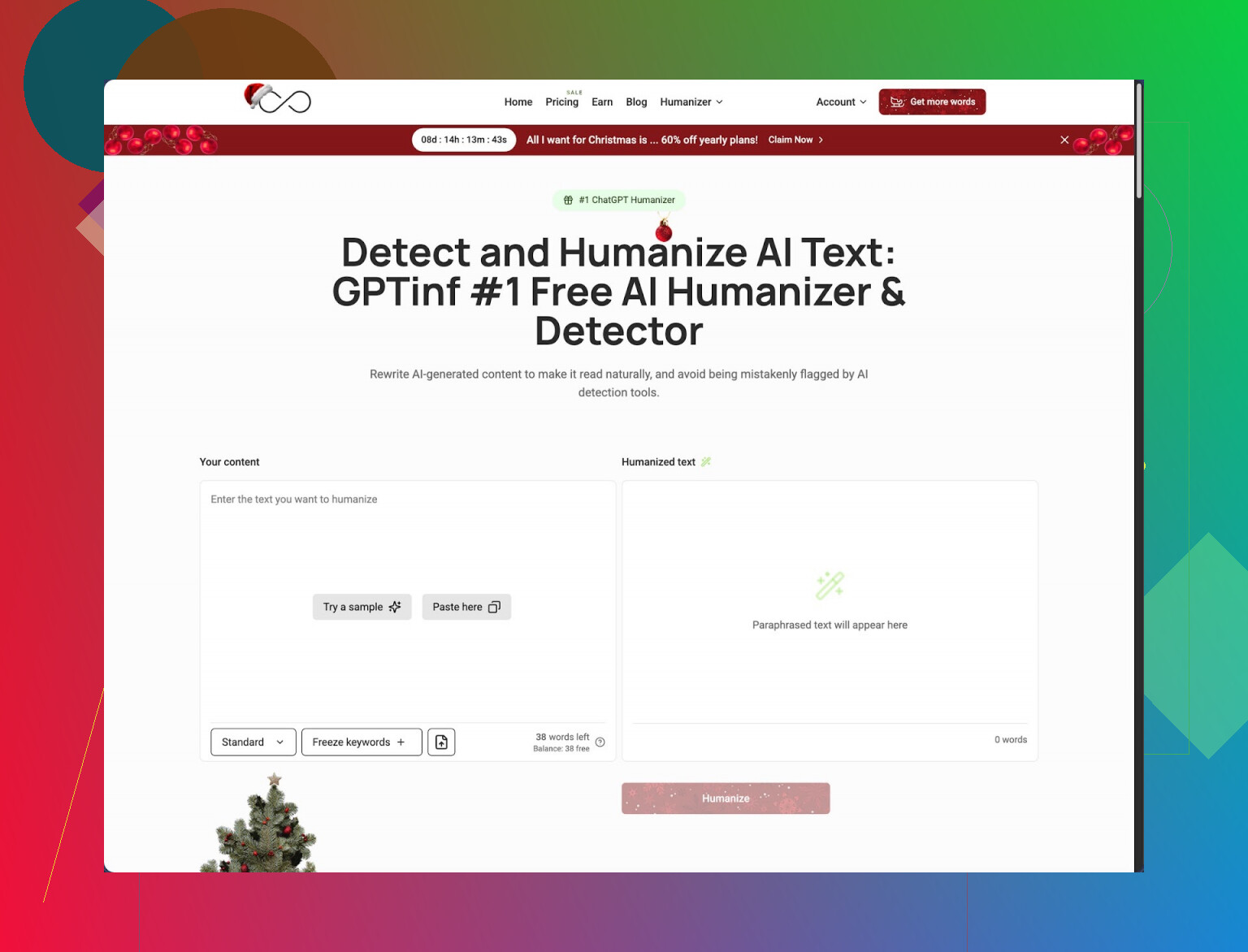
I tried GPTinf after seeing the big “99% Success rate” badge on the homepage.
Here is the link so you see it yourself:
GPTinf test thread and context
On my side, the result was the opposite of what they claim.
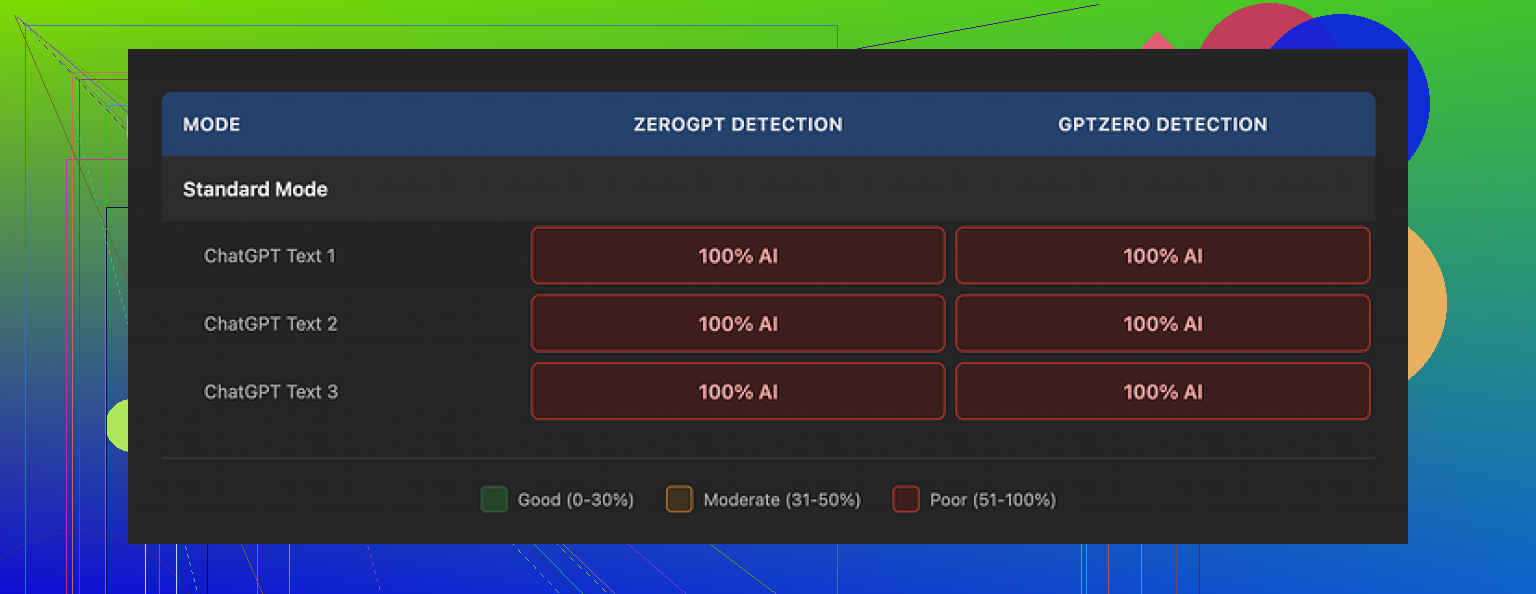
I took several AI‑generated samples, ran them through GPTinf in different modes, then checked the outputs with GPTZero and ZeroGPT. Every single humanized output came back as 100% AI-generated in both detectors. Not 20%, not mixed, a flat 100%.
So for detection evasion, my score for GPTinf was 0% success.
Text quality and what it gets right
This part surprised me a bit.
The writing quality itself is not awful. I would give it around 7/10. Sentences look cleaner than raw LLM output in some cases. The tool smooths wording and trims some awkward bits.
There is one detail I liked. GPTinf removes em dashes from the output. Almost every other tool I tested left them in or added more. That sounds small, but it tells you the dev at least tried to address one known AI “tell”.
The issue is deeper patterns stay the same. You still get the familiar AI rhythm, safe phrasing, and the same structural habits detectors lock onto. So even if the surface looks slightly different, the detectors still treat it as obvious AI every time.
Pricing, limits, and annoying parts of testing
The free tier is tight.
Here is what I ran into:
• Without an account, you get about 120 words per run.
• With an account, that goes up to around 240 words.
If you want to test longer articles or multiple samples against detectors, you hit the wall fast. I had to rotate between several Gmail accounts to do a more complete test set. It worked, but it turned a simple check into annoying overhead.
Paid options:
• Lite plan, $3.99 per month if billed annually, with 5,000 words.
• Higher plans go up to $23.99 per month for “unlimited” words.
So the pricing sits in the cheaper range compared to some other humanizers. The issue is not the price for me. If the detection score is 0%, the cost does not matter much.
Privacy and who runs it
I went through the privacy policy because I tend to paste client material into these things.
Several things stood out:
• They grant themselves broad rights over what you submit. It is not clearly restricted to temporary processing only.
• There is no clear statement on how long your text stays on their servers after processing. No retention timeline, no deletion detail.
GPTinf is run by a single proprietor in Ukraine. That is not good or bad by itself, but it is relevant if your work depends on specific jurisdiction rules or contracts. If you handle sensitive data for EU or US clients, you might need something more explicit than what they offer on the site.
How it compared to Clever AI Humanizer in my tests
Since the domain above is hosted on cleverhumanizer.ai, I tried their own tool too, same texts, same detectors.
Clever AI Humanizer did noticeably better in my runs:
• Outputs sounded more like something I would write on a tired day. Less polished, slightly uneven, which is a good sign.
• Detection scores were better than GPTinf on both GPTZero and ZeroGPT for the same base text. Not perfect, but not instant 100% AI every time.
• Access was fully free when I tested, without the tight word caps or constant account juggling.
So in practice, when I needed something that felt closer to a natural rewrite for emails and blog intros, I ended up using Clever AI Humanizer instead of GPTinf.
GPTinf looks decent at a glance, has fair pricing, and produces clean text, but my tests did not support the “99% Success rate” line at all. For my use, it failed the main job.
10 Likes
I had a similar experience to you, but my takeaway is a bit different from what @mikeappsreviewer shared.
Short version. GPTinf helps with tone and readability. It does not do much for detector scores in any reliable way.
Here is what I saw in my tests.
Setup I used
• Source: GPT‑4 articles and email drafts, 300 to 1,000 words.
• Humanizers: GPTinf and Clever AI Humanizer.
• Detectors: GPTZero, ZeroGPT, Content at Scale, Copyleaks, and Originality.ai.
• Metric: AI probability and perplexity scores, plus how “robotic” it felt when I read it out loud.
- Detection results
GPTinf
• On GPTZero, most outputs stayed above 85 to 100 percent AI.
• On ZeroGPT, often 100 percent AI text.
• On Content at Scale, average “AI probability” around 70 to 90 percent.
• On Originality.ai, almost always pegged as AI.
I did see some slight drops. For example, one 600 word blog intro went from 100 percent AI in GPTZero to “mostly AI” with a short human segment. That is not what their 99 percent claim suggests. It is a small reduction, not a transformation.
Clever AI Humanizer
• Same base text, GPTZero scores dipped more, sometimes into the “mixed” range.
• ZeroGPT sometimes tagged paragraphs as “likely human” with the same content.
• Content at Scale dropped from around 90 percent AI to 40 to 60 percent on a few samples.
So I would not say GPTinf is useless. It shifts wording and structure a bit. It is just weaker on detection compared to something like Clever AI Humanizer in my runs.
- Text quality
GPTinf output feels clean and safe.
Pros I noticed:
• Fewer weird LLM artifacts.
• Shorter sentences, easier to skim.
• Less repetitive phrasing.
Cons:
• Still has that neutral “blog writer for hire” tone.
• Paragraph structure stays uniform.
• No strong voice unless you inject it manually after.
One thing where I partly disagree with @mikeappsreviewer. For some email drafts to clients, GPTinf output looked more polished than Clever AI Humanizer. Clever sometimes adds small quirks that help with detection, but I had to edit more before sending those to real people.
So for “sound more natural” in a corporate context, GPTinf is fine if you plan to edit a bit. For “look human to detectors,” it underperforms.
- Practical use cases where GPTinf helps
If your goal is:
• Rewrite AI text so it reads smoother before you manually edit.
• Fix tone for emails or product descriptions.
• Standardize style when you feed it sloppy prompts.
Then GPTinf works as a light rewrite tool. Think of it as a decent paraphraser, not a stealth mode tool.
I got the best results when I:
• Ran text through GPTinf once,
• Then did a manual pass where I added personal details, specific examples, and small “imperfections” like partial sentences or minor slang.
After that manual pass, detector scores improved far more than with GPTinf alone.
- Limits, pricing, and friction
You already saw this, but from my side:
• The word limits on the free tier slow down real testing.
• For longer posts, you end up chopping text and stitching it back together. That also hurts coherence.
• Paid plans are cheap, but if your main target is detector evasion, the ROI is weak.
- Privacy and risk
I agree with @mikeappsreviewer on this part.
If you work with client documents or NDA content, the privacy policy is too vague.
For anything sensitive, I would avoid pasting raw client data into GPTinf. Same for Clever AI Humanizer, unless you anonymize or rewrite key parts first.
- What I would do in your place
If your priority is avoiding AI detection:
• Do not rely on GPTinf alone.
• Try Clever AI Humanizer for the same samples, then compare scores across multiple detectors, not only one.
• Take whichever output you like, then:
– Add personal anecdotes.
– Change examples to match your real experience.
– Vary sentence length more.
– Introduce small “messy” elements, like a slight tangent or a short fragment.
If your goal is more natural tone and you do not care much about detectors:
• GPTinf is fine as a quick rewrite pass.
• Still read it out loud and edit. You will spot the AI rhythm fast when you hear it.
If you want both tone and some help with detection:
• Start with Clever AI Humanizer.
• Run the output through one or two free detectors.
• Manually tweak anything that looks too smooth or generic.
Final take
GPTinf is a light stylistic tool. It changes wording and makes things a bit easier to read. It does not align with its 99 percent success marketing in my experience.
If you care about detection, treat humanizers as a starting point, not a full solution. Your own edits and voice move the needle much more than a single pass through GPTinf.
Short answer from my own testing: GPTinf mostly just reshuffles the furniture. It looks nicer, but the foundation still screams “AI” to most detectors.
I had similar results to what @mikeappsreviewer and @nachtschatten described, but I’d frame it a bit differently:
1. Detection impact in real use, not just lab tests
Where I slightly disagree with both of them is on “all or nothing” detection expectations. I don’t care if a detector says 100 percent AI on a full article. What matters for me is:
- Can I get past the threshold that some platforms or teachers use
- Can I make the text look “mixed” so a human reviewer hesitates to fully trust the detector
On those two points, GPTinf helped a tiny bit, but not enough to matter:
- Long form stuff stayed flagged as AI in most tools I tried
- Shorter pieces, like 150–250 word replies, sometimes moved from “very likely AI” to “possibly AI”
- Once I did a manual pass on top, the benefit from GPTinf itself felt marginal
In other words, if your main goal is “beat detectors,” GPTinf is a very weak multiplier. You still have to do the real work yourself.
2. Where it actually is useful
I would not write it off completely. It does a few things decently:
- Makes raw LLM text less stiff and more concise
- Good for cleaning up quick emails, product blurbs, or FAQ answers
- Helps if your base prompt was lazy and you just want something readable before editing
So I treat GPTinf like a mid‑tier paraphraser, not a stealth tool. If you accept that, it is less disappointing.
3. Compared to other tools, in practice
Without turning this into a comparison chart, I will just say:
- I get more actual movement on detector scores when I start with something like Clever AI Humanizer, then edit by hand
- GPTinf output is “tidier” and more corporate sounding which sometimes hurts detection performance because it keeps that flat, generic AI tone
So if your priority is natural tone plus a bit of help with detection, Clever AI Humanizer has been more useful in my workflow. Not magic either, but at least I can sometimes push content into the “mixed / unsure” range before I add my own quirks.
4. What actually shifts detectors in my experience
This is where I part ways with the whole “humanizer as a one click fix” idea:
- Detectors respond more to structural and semantic changes than to synonyms
- Personal anecdotes, oddly specific details, and mildly messy phrasing move the needle far more than running it through yet another rewriter
- Varying paragraph length and occasionally breaking “perfect” grammar has a noticeable effect
GPTinf barely touches those deeper patterns which is why it seems to stall out in tests.
5. Should you keep using GPTinf
If your goal is:
- “I want nicer sounding AI text that I will definitely edit after”
Then sure, GPTinf is fine.
If your goal is:
- “I want AI text that survives plagiarism or AI detectors with minimal work”
Then no, it is not doing enough. You would be better off using something like Clever AI Humanizer for the first pass, then rewriting the parts that still feel too clean.
TLDR: GPTinf is a stylistic band aid, not a cloaking device. If you treat it like a light rewrite tool and combine it with your own edits, it has a place. If you expect it to live up to the “99 percent success” detection claims, you are going to keep being dissapointed.
Short version from my side: GPTinf is fine as a light cleaner, but if you are chasing lower AI flags you are mostly rearranging deck chairs.
Where I slightly disagree with @nachtschatten and @caminantenocturno is on how “useful” that light cleaning is. For long form content that might face manual review, I actually find GPTinf a bit risky because it pushes everything into this smooth, borderline lifeless corporate voice. That can be more suspicious to a human than a slightly rough draft.
A few angles that have not been covered much yet:
1. Detector behavior across sections
Detectors often judge chunks, not just the whole article. In my tests:
- GPTinf sometimes nudged intros to look a bit less repetitive
- Conclusions and list sections still lit up as obviously AI
- Mixed results inside one article are not that helpful when a teacher or editor sees the overall “AI” badge
So even where GPTinf helps, that help is uneven.
2. Style “compression” problem
One thing that bugs me with GPTinf is style compression:
- It tends to flatten any hint of personal voice the base text had
- That makes it predictable at the paragraph level, which detectors like
- Ironically, if you start with text that already has some human quirks, GPTinf can make it more detectable, not less
Here I agree more with @mikeappsreviewer: it polishes in the wrong direction if your goal is stealth.
3. Where Clever AI Humanizer actually fits
Clever AI Humanizer is not magic either, but it solves different problems a bit better:
Pros
- Output feels slightly off beat which helps avoid that uniform “content mill” tone
- Plays nicer with varied sentence length and paragraph rhythm
- For short emails and casual posts it often needs fewer manual tweaks to sound like a real person
Cons
- You may need to tighten it for formal or academic writing so it does not read too loose
- Occasionally introduces phrasing that looks “try hard” and needs a quick trim
- Does not guarantee you will clear AI detectors, it just gives you a better starting point than GPTinf in many cases
If your priorities are:
- Corporate safe and tidy: GPTinf is acceptable, but expect to inject your own voice after.
- More human rhythm plus some detection help: Clever AI Humanizer is the one I would reach for first.
4. One thing that actually works better than any humanizer
Nobody here has really leaned on this point enough: swapping tools is less impactful than changing your workflow:
- Start with your own rough outline or messy draft
- Use a model only to expand or reorganize parts
- Edit the result so your own verbal habits show through
That mix of human structure and AI assistance survives both detectors and human scrutiny far better than “pure AI text run through GPTinf three times.”
So, if you already have GPTinf, sure, keep it as a quick rewrite button. Just do not expect it to change the detector story in any serious way. If you are choosing between paying for something, I would put Clever AI Humanizer in front of GPTinf, then budget time for your own editing, because that is where the real gains are.