My Facebook app on iPhone is taking up a lot of storage and acting slow. I want to clear cached data, cookies, or app data without deleting my Facebook account, losing photos, messages, or login access. What’s the safest way to do this?
If you need space back fast, the cleanest fix is usually deleting Facebook and reinstalling it. Offloading can help a little, but if the app is sitting at 10GB or 15GB, the huge part is usually the saved local data, not the app itself.
iOS is annoying about this because there’s no simple “clear cache” button like you get on Android. The closest built-in option is here: Settings > General > iPhone Storage > Facebook.
From there, you’ve got two choices.
Offload App is the lighter option. It removes the Facebook app from your phone, but it keeps your documents and data. When you tap the icon again, iOS redownloads the app. Some temporary junk may get cleared out, and you normally stay signed in, which is the nice part.
But for the really bloated Facebook installs, offloading usually doesn’t make a big enough dent. The storage hog is often the Documents & Data section, where Facebook has piled up cached videos, images, browser data, and other stuff from months of scrolling.
For the full reset, use Delete App from that same iPhone Storage screen, then reinstall Facebook from the App Store.
Yes, that will log you out. You’ll need to sign in again afterward. But it will not delete your Facebook account, posts, friends, messages, or photos. That stuff lives on Facebook’s servers. Deleting the app only wipes the local copy stored on your iPhone, which is why it can take the app from something ridiculous like 15GB back down to a normal size.
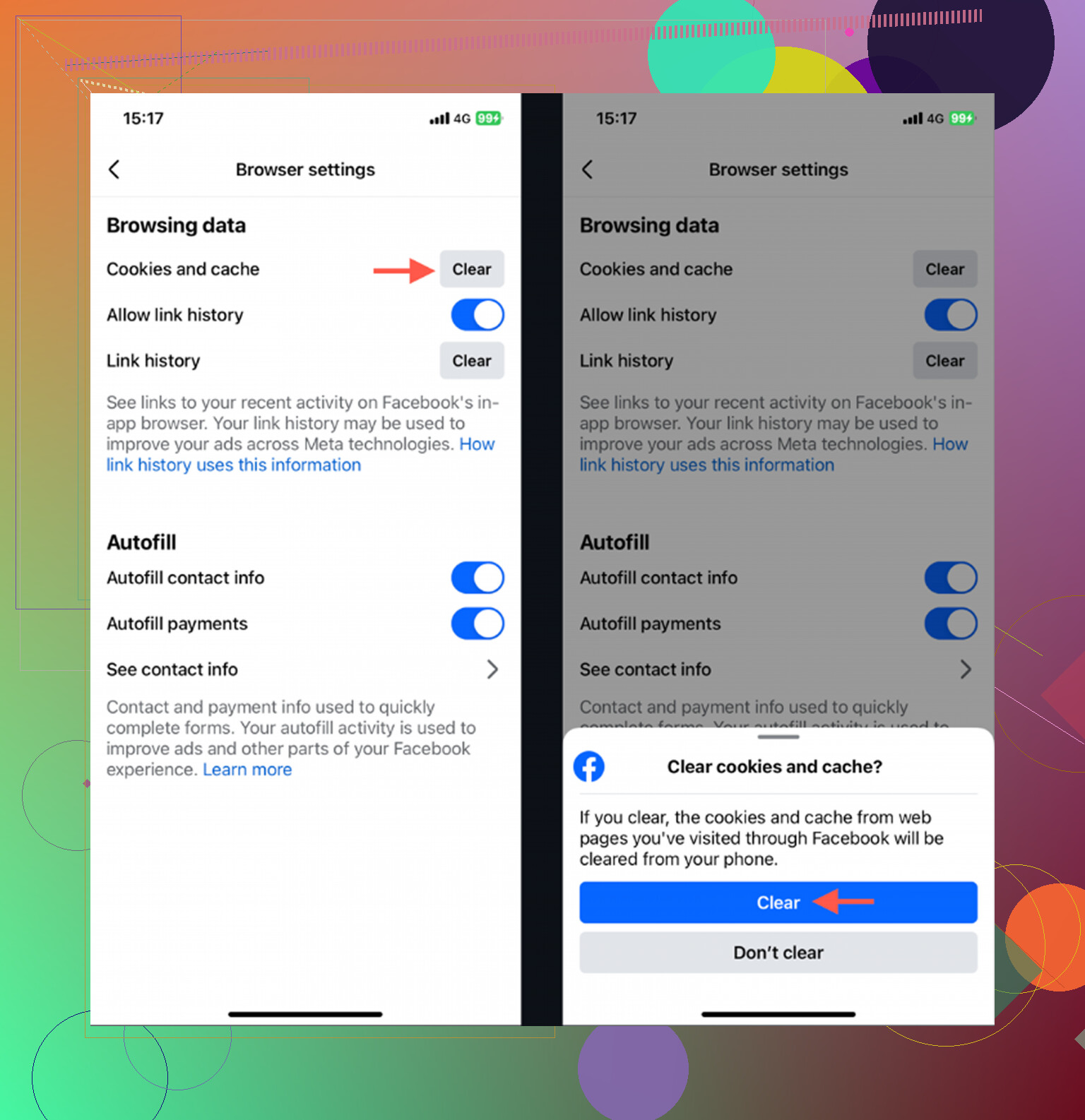
There is also a small cleanup option inside Facebook itself. Go to Menu with the three lines, then Settings & Privacy > Settings > Browser, and clear the in-app browser cookies/cache. It’s worth doing, but don’t expect it to fix a giant storage number by itself.
The annoying part is that this fix does not last forever. Facebook rebuilds its cache as you use it. If you clear everything today and then spend a bunch of time watching Reels tomorrow, the storage number will start creeping up again. That’s just how the app works so it can load media faster.
I went through this cycle for a while, constantly checking app sizes and blaming Facebook for my 128GB iPhone being full. Eventually I looked more closely at iPhone Storage and realized the bigger problem was my Photo Library. I had tons of duplicate-looking photos, old screenshots, and a few huge 4K videos I had completely forgotten about.
That’s when I started using Clever Cleaner. I’m usually suspicious of cleaner apps because a lot of them are basically ad machines or subscription traps, but this one is free. No ads, no paywall.
It will not clear Facebook’s cache for you, since iOS doesn’t really allow that kind of automatic cleanup. What it does well is help you clean up photos and videos. The Heavies section sorts media by file size, so you can quickly spot the giant videos taking up space. The Similars section groups together photos that look alike, which makes it easier to delete all the extra shots you took trying to get one good picture.
It also shows the exact file size for screenshots, which is kind of eye-opening if you have hundreds of random ones saved. And the processing happens on-device, so your photos are not being uploaded somewhere else for the cleanup features to work.
So if Facebook is already at 15GB, delete and reinstall it first. That gives you breathing room right away. But if your phone keeps running out of storage, check your photos and videos next. Cleaning out the big media files did way more for me than repeatedly clearing app caches.
19 Likes
Deleting the app is not the same thing as deleting your Facebook account. The only thing I’d be careful about before doing the reinstall route is making sure you actually know your Facebook password and can access whatever phone number/email or 2FA app is tied to the account. A lot of people are “logged in forever” and only find out after deleting the app that their recovery email is old or their code goes to a dead number. Check that first in Facebook settings, then delete/reinstall if storage is the problem. Your photos, posts, friends, Marketplace stuff, and Messenger history should still be on the account, but your saved login session on that iPhone will be gone.
Don’t touch “Deactivate or delete account” in Facebook settings. That has nothing to do with clearing iPhone storage. Delete the Facebook app through Settings > General > iPhone Storage, then reinstall it. Your server-stored photos, posts, and messages remain, but local drafts and saved login data may disappear. If Messenger is installed separately, it has its own storage and won’t be cleaned when you remove Facebook.
Honestly, expect the storage win from a reinstall to be temporary. If you’re a heavy Reels or video watcher, that 15GB creeps right back within a couple weeks, so this isn’t a one-time fix. @lena_codes nailed the part everyone forgets though: Messenger hoards its own cache separately, so clear that one too if you actually want the space back.
Don’t clear Safari’s history expecting it to shrink the Facebook app. That mainly removes website cookies and may sign you out of sites, while Facebook’s large “Documents & Data” number can stay exactly where it is.
What confused me was the difference between offloading and deleting. Offload App keeps the stored data, so it may not solve the problem if that data is what takes up several gigabytes. Delete App removes Facebook’s local files from the iPhone. It does not delete the actual Facebook account or anything already uploaded to it.
Before deleting, make sure any unfinished post, draft, or pending photo upload is completed, since local items can disappear. Confirm your password and recovery method too. Then use Settings > General > iPhone Storage > Facebook > Delete App. Reinstall from the App Store and sign back in. Avoid the “Deactivate or delete account” section inside Facebook because that is an entirely different action.
If the cache keeps returning, you can leave the app deleted and use Facebook through Safari instead. The website is less convenient and notifications may be limited, but it avoids letting the app build up another huge local cache. Messenger still needs separate attention if it is installed.
Don’t pay for a “cache cleaner” expecting it to wipe Facebook’s app data. iOS keeps apps separated, so another app cannot reach into Facebook and remove its cache. At best, those cleaners help with photos, videos, or contacts.
Before deleting Facebook, test your login at facebook.com in a private Safari tab. That confirms you know the password and can complete two-factor authentication without relying on the app’s saved session. Finish any pending uploads and copy any unpublished drafts you care about, since those may exist only on the phone.
Then go to Settings > General > iPhone Storage > Facebook > Delete App. Reinstall it from the App Store and sign back in. Your account, uploaded photos, posts, friends, and Facebook-stored messages are tied to your account, not that installation. Avoid the account deletion menu inside Facebook, which is unrelated.
I’m less convinced that offloading is worth trying when Documents & Data is the main storage problem. It deliberately preserves that data, so the big number may barely change. A full reinstall is more inconvenient but usually makes more sense. Check Messenger separately, and give the iPhone Storage screen a little time to recalculate after deleting because its numbers do not always update immediately.
If the number under Facebook is mostly “App Size,” offloading may recover enough space. If “Documents & Data” is the large number, offloading preserves that data by design, so deleting and reinstalling is the effective option.
Before deleting, verify your password and two-factor authentication outside the app, preferably by signing in through a private Safari tab. Then finish pending uploads and save any unpublished drafts. Go to Settings > General > iPhone Storage > Facebook > Delete App, reinstall it from the App Store, and sign back in. This removes the local installation and cache, not the Facebook account or content already stored online.
Clearing Facebook’s in-app browser data is useful mainly for cookies and pages opened inside Facebook. It usually will not reclaim several gigabytes of cached photos and videos. Expect some settings, downloaded media, drafts, and login information stored only on that iPhone to disappear. Messenger is a separate app and must be handled separately if its storage is large too.
“Remove from Home Screen” does not clear anything, because apparently hiding the icon counts as an option. Choose “Delete App” instead, reinstall Facebook, and sign back in; your account and uploaded content stay intact, but drafts and local downloads may not.