Walter Writes AI Review, from someone who got way too nerdy with detectors
I spent an evening messing around with Walter Writes AI and feeding the output into a few detectors. Results were all over the map.
I used the free version only, which locks you into their “Simple” mode. The paid plans add “Standard” and “Enhanced” bypass options, so keep that in mind before you read too much into this.
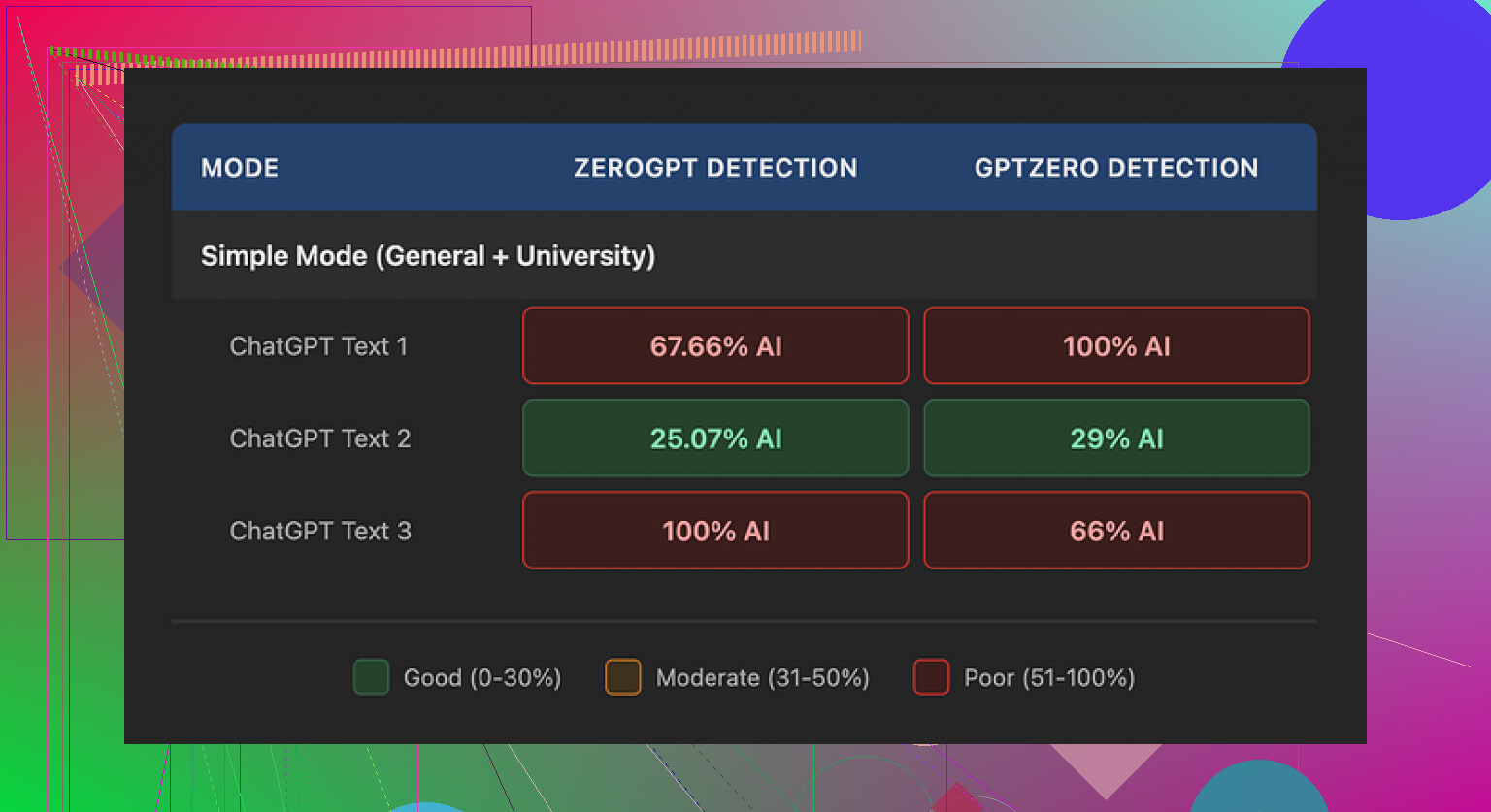
I ran three samples from Walter into GPTZero and ZeroGPT:
One sample looked decent:
- GPTZero: 29%
- ZeroGPT: 25%
For a free tool, those numbers are not bad at all. Most of the free “humanizers” I have tried either get flagged as 80 to 100 percent AI or completely fall apart stylistically.
The other two samples told a different story:
- Both hit 100% on at least one detector.
So you get this weird split. Sometimes it slips through, sometimes it lights up every alarm. If you are trying to stay under radar consistently, that randomness is a problem.
Here is the screenshot from the runs:
Writing quality and patterns I kept seeing
The text “worked” at a surface level, but once I read it slowly a few things stuck out.
- Semicolon spam
The tool kept dropping semicolons in spots where a human would almost always use a comma or split the sentence.
Example pattern:
“Climate change affects our lives; it influences the food we eat; it shapes the weather patterns we see daily.”
Stuff like that. It reads stiff. Most people do not write like a college textbook in 2025. After a few paragraphs it starts to feel robotic.
- Word repetition
In one sample, the word “today” showed up four times in three sentences. Same structure, same rhythm, back to back. That is exactly the kind of repetition detectors love.
If you are trying to pass a human review, that “today, today, today” pattern jumps off the page.
- Parentheses pattern
The output leaned hard on parenthetical examples.
Repeated structure:
- “(e.g., storms, droughts)”
- “(e.g., social media, online forums)”
- “(e.g., students, professionals)”
Same formatting, same phrasing, over and over. It felt like something generated from a template rather than how people naturally explain things to each other. Detectors tend to latch onto those formulaic constructions.
If you plan to use Walter, you will need to go line by line and clean this stuff manually. Change punctuation. Strip excess parentheses. Break long chains of clauses. Kill repeated sentence starters like “Today” and “In today’s world” and “Nowadays”.
Pricing and limits
Here is how the plans looked when I checked:
- Starter plan: 8 dollars per month on annual billing, 30,000 words per month
- Unlimited tier: 26 dollars per month, but each submission is capped at 2,000 words
- Free tier: 300 words total to test it
That “Unlimited” piece is a bit misleading for anyone trying to process long docs in one go. You end up chunking everything into 2,000 word blocks, which adds more seams and more room for pattern repetition.
Policy stuff that bothered me
Two things annoyed me enough to write them down:
-
Refund terms
The refund language came across aggressive. It mentions chargebacks and brings up legal action. For a small SaaS-type tool, that tone feels off. If you are testing multiple tools, that sort of policy is a red flag. -
Data handling
Text retention is not explained clearly. I did not see a simple breakdown of how long they keep your input, what they use it for, or how to purge it. For anyone dealing with client work, homework, internal docs, or anything non-public, that missing clarity is a problem.
If you work in a field where confidentiality matters, do not skip this part. If a tool is vague here, I would not run anything sensitive through it.
What I ended up using instead
After comparing outputs, I kept going back to Clever AI Humanizer.
Site:
In my tests, its output felt more like how people on forums or in emails write. Less textbook tone, fewer odd punctuation choices, fewer repeated “AI-y” phrases. Also, no payment wall for basic use when I tried it, which made it easier to experiment without doing subscription math.
If you want step by step examples, the Reddit threads below helped me sanity check some of this.
Humanize AI tutorial on Reddit:
Clever AI Humanizer review on Reddit:
YouTube review:

If you try Walter, my advice
If you decide to mess with Walter Writes AI anyway, here is how I would use it based on my tests:
- Treat it as a “rough pass” only, not final text
- Run multiple short batches instead of big ones, then mix sentences manually
- Rewrite or delete sentences with semicolons, especially long chains
- Remove or rephrase “(e.g., …)” style parentheses
- Search for repeated words like “today” or “nowadays” and swap them
- Keep anything sensitive away from it until the data policy gets spelled out clearly
With that workflow, you might get some use out of it, but I would not rely on it as a one-click humanizer.