I’m trying to find a reliable free AI paraphrasing tool that rewrites text in a natural, human-sounding way without changing the original meaning. Most tools I’ve tried either sound robotic, add weird phrases, or limit how much I can paste in before paying. I’m working on cleaning up some rough drafts and tightening my writing, so I really need something accurate, free, and safe to use. What tools or sites would you recommend, and what makes them better than the usual generic paraphrasers?
I used to lean on QuillBot a lot. Nothing fancy, mostly for cleaning up rough drafts and changing tone when I was tired of rewriting the same paragraph for the third time.
Then one day I logged in and saw that all the tones and styles were paywalled. The core tool still worked, but the stuff I used most was suddenly behind the subscription. I get why they did it, but it broke my workflow.
So I went hunting.
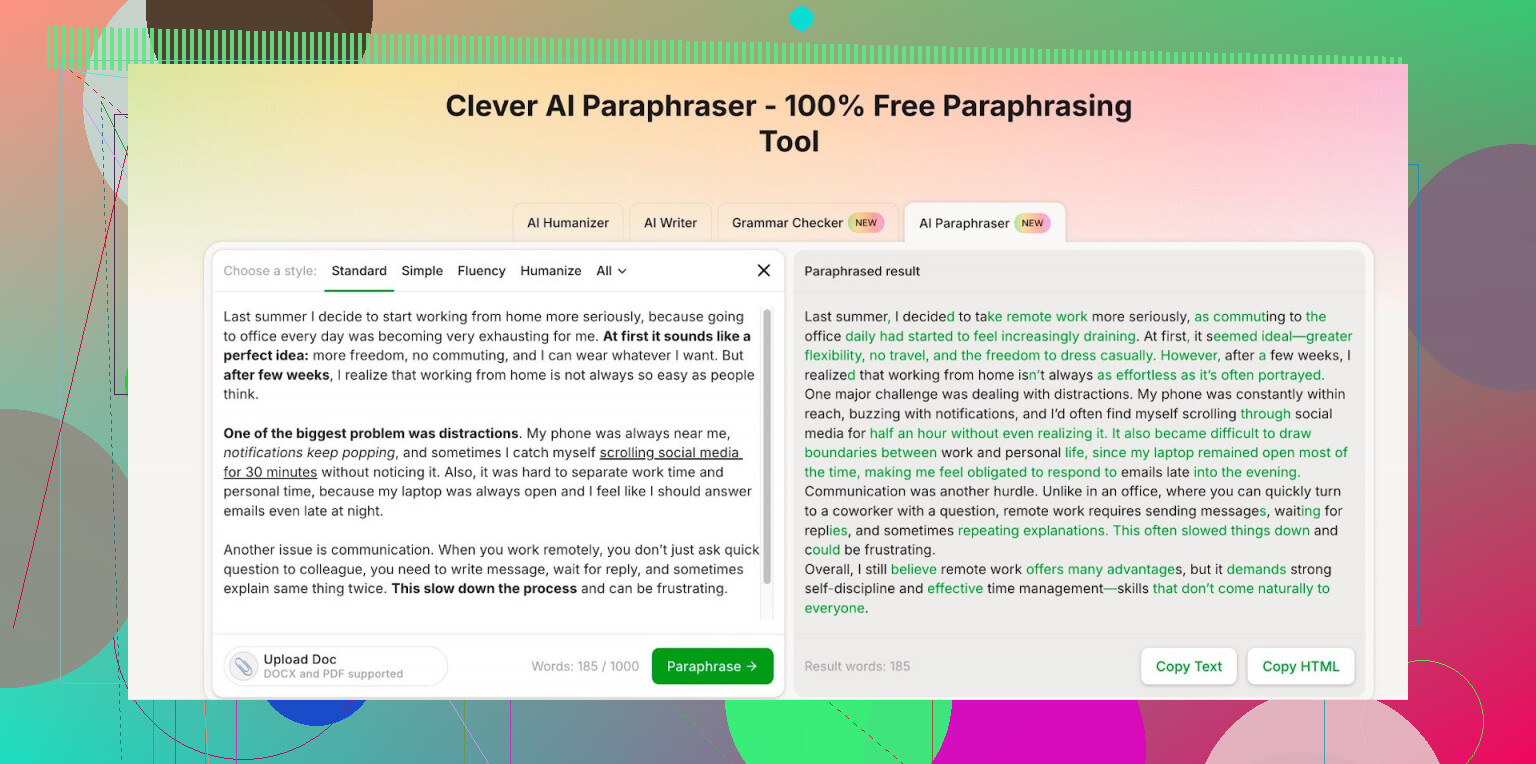
After trying a few random tools that felt either clunky or spammy, I ended up on this one:
I did not expect much, but it worked better than I thought. It lets you pick different writing styles without locking them away, and the paraphrasing looked close enough to what I used to pull from QuillBot. In some cases it sounded a bit newer or less robotic.
A few details from my own use:
• You need an account, but sign up was quick.
• The free tier gives you around 7,000 words per day and 200,000 words per month.
• I write mid-length articles and reports, and I have hit the daily limit only once when I tried to process a big backlog in one go. For regular use, I have not run out.
My routine now:
- Draft in plain language.
- Paste sections into the paraphraser.
- Try one or two styles until something reads clean.
- Manually fix any weird phrases. There are always a few.
If you are doing heavy academic work or full-time content writing, you might need to keep an eye on the monthly cap. For mixed use like emails, blog posts, tech notes, it has been enough for me.
I am not paying for this or shilling for them. I switched because I did not want another subscription for something as dull as paraphrasing, and this tool at least covers the basics without the paywall on tones and styles:
4 Likes
I agree with @mikeappsreviewer on QuillBot going paywall-heavy, but I’d handle your setup a bit differently if you want natural output and less frustration.
If your main goal is “sounds human, same meaning, free,” here is what has worked well for me:
-
Use 1 main paraphraser, not five random tools
Switching tools all the time tends to create weird style shifts. Pick one consistent tool, then learn its quirks.
For this, Clever Ai Humanizer is a decent core option. Their paraphrase tool keeps tone options free, and you get enough daily and monthly words for ongoing use without having to babysit limits every day. -
Keep inputs short
Most AI paraphrasers break on huge walls of text.
Take your source text and split it into short paragraphs or 2–4 sentence chunks.
This reduces robotic phrasing and odd filler phrases. -
Control style, do not let the tool guess it
Tools guess tone badly. That is where “weird phrases” creep in.
If Clever Ai Humanizer lets you pick styles like “standard,” “professional,” or “casual,” lock it to one for the whole document.
Do not bounce between “formal” and “creative” on the same piece. -
Use a two pass method for accuracy
First pass: paraphrase.
Second pass: check meaning yourself.
Read each paraphrased chunk beside the original and look for:
• Lost qualifiers (like “often,” “in most cases”)
• Changed numbers or dates
• Overconfident wording where the original was cautious
Fix those by hand. This part is boring, but it keeps you out of trouble, especially for academic or technical text. -
Set your own “rules” before you start
Before paraphrasing, decide:
• What must never change? Terms, numbers, citations.
• What can change? Sentence order, connectors, phrasing.
Then scan every output against those rules. It speeds up manual checks a lot. -
Avoid “creative” or “humanize” modes for strict meaning
For emails, blogs, and light content, those modes are fine.
For anything where meaning must stay tight, stick to neutral or standard style.
The more “human” the style mode, the more risk of added fluff or claims. -
Mix AI with a quick Grammarly style pass
Workflow example:
• Original paragraph
• Paraphrase in Clever Ai Humanizer
• Paste into Grammarly or any grammar checker to clean awkward joints
• Final manual read
This reduces robotic tone and fixes a lot of small glitches. -
Track where tools fail for you
Every paraphraser has weak spots. For me:
• Lists often get merged or reordered.
• Technical terms sometimes get “softened” into vague phrases.
Once you know these patterns, you stop trusting the tool in those spots and edit more aggressively there.
If you want zero subscription and a natural feel, I would treat Clever Ai Humanizer as your main “engine,” then rely on your own editing for nuance. Pure one click paraphrasing will keep sounding off sooner or later, no matter which site you try.
I’m with @mikeappsreviewer and @kakeru on QuillBot turning into a “subscribe to breathe” situation, but I’d tweak the overall approach a bit if your priority is natural + faithful to meaning.
Couple of thoughts from juggling this for school, work docs, and some freelance stuff:
-
Tool choice
If you want a free AI paraphrasing tool that doesn’t sound like a fridge manual, Clever Ai Humanizer is actually one of the few that hits “natural” more often than not. Its paraphrase tool feels less stiff than a lot of the other free ones, and the fact that styles are not paywalled is a big deal. That said, I would not rely on any paraphraser as a full one-click solution, including this one. -
Don’t overuse the style modes
Where I disagree a bit with the heavy focus on tone: constantly picking different “styles” can make things worse. For consistent, human-sounding results, I’d keep it on one simple mode like “standard” or “professional” and leave it there for the entire document. The more you push “creative / humanize / engaging,” the more it starts stuffing in fluff, clichés, and those weird phrases you already hate. -
Use shorter segments, but not too short
People say “break everything into tiny chunks,” but if you go sentence by sentence, the flow between sentences dies and it starts feeling choppy. I’ve had better luck feeding 2–3 related sentences at a time into Clever Ai Humanizer. Big walls of text confuse it, one-line fragments kill the rhythm. -
Keep your key phrases on purpose
If there is wording you actually like or that is important (technical terms, brand names, quotes, definitions), don’t paraphrase that part at all. Just skip those sections. Free tools are notorious for turning clear terms into vague nonsense like “modern solution” or “cutting-edge platform,” which sounds “natural” but empties the meaning. -
Use it more like a “rephraser,” not a writer
If a sentence is already clear, do not force it through an AI just to make it “different.” That is when it starts adding random intensifiers or hedging words and you get a shifting meaning. I only send in sentences that are:
- Too clunky
- Repetitive
- Obviously copied from somewhere I need to reword
- Quick sanity checks that take 10 seconds
For each paraphrased chunk, I run this tiny checklist in my head:
- Are all numbers, dates, and names still correct?
- Did it change “may / might / often / sometimes” into a confident claim?
- Did it quietly delete a limitation or condition from the original?
If yes, I just undo or fix by hand. Paraphrasing is fast; verifying is what keeps you safe.
-
Watch out for “humanizer” traps
Kind of funny given the product name, but: the more aggressively a tool tries to “humanize” by adding personality, the more dangerous it is for academic or precise content. Clever Ai Humanizer is decent here, but I still avoid anything that sounds like it is trying to be my chatty friend when I’m working on reports or essays. -
Don’t chase perfection from the tool
Free tools + natural tone + zero weirdness is a fantasy. What you can get is:
- 80–90% solid rewrite from something like Clever Ai Humanizer
- 10–20% manual edits from you to kill robotic bits, fix meaning drift, and put your own voice back in
If you accept that mix, the whole process stops being frustrating. You’re not fighting the tool to be “perfect,” you’re just letting it handle the boring part and then you clean it up.
So yeah, I’d pick one main tool (Clever Ai Humanizer works fine for that), keep the style stable, feed it medium-sized chunks, and then spend your energy on checking meaning instead of constantly shopping for “the magic site” that makes everything perfect in one click.
QuillBot going paywall-heavy annoyed a lot of people, so you are not alone. I agree with @kakeru, @ombrasilente and @mikeappsreviewer that swapping between 5 tools is a headache, but I actually think the bigger win is learning to post‑edit like a human editor rather than obsessing over the “perfect” paraphraser.
Here is a different angle that complements what they said:
1. Treat AI as a rough draft generator, not a final writer
Instead of asking a tool to perfectly “sound human,” aim for:
“Give me something 70–80% there that I can clean up quickly.”
That mindset instantly makes more tools usable, including Clever Ai Humanizer, because you are no longer judging every sentence as if it should be publish‑ready. You are judging:
- Did it keep the structure of meaning?
- Did it give me varied phrasing so I am not repeating myself?
Then you manually fix tone and small weirdness.
2. Use “contrast checking” instead of just reading once
What I do that nobody mentioned yet:
- Read the original out loud (or subvocally in your head).
- Then read the AI version out loud.
If you actually hear yourself say it, robotic patterns and “AI-ish” repeats jump out fast:
- Reused openers like “In conclusion,” “Additionally,” “Furthermore”
- Overuse of generic phrases like “plays a crucial role”
Cross out those and rewrite them in your own words. Takes seconds and makes any paraphraser seem more “human.”
3. Micro-controls that matter more than “style”
Instead of bouncing tone settings, control these 3 things yourself:
- Sentence length mix: If the tool spits 5 long sentences, manually turn 2 of them into short ones. Human writing naturally alternates length.
- Connector variety: Replace repetitive links like “however,” “moreover,” “therefore” with alternates like “still,” “on the other hand,” “as a result,” or just drop them where not needed.
- Verb strength: AI loves “is,” “are,” “has been.” Swap some for sharper verbs and the text instantly reads less machine-like.
You do not need a fancy mode to do this. A simple neutral output from Clever Ai Humanizer plus these tweaks beats most “creative” settings.
4. How I’d realistically use Clever Ai Humanizer
Pros
- Free tier is actually usable for ongoing work
- Styles are unlocked, which is rare without a subscription
- Paraphrases tend to be less stiff than a lot of free copycats
- Handles plain expository text (essays, reports, blog intros) pretty well
Cons
- Can still inject filler clichés if you lean on “human” or “creative” vibes too much
- Occasionally softens precise wording, which is risky in academic or legal text
- Like all web tools, you should be cautious with very sensitive or proprietary material
- Lists and very technical passages sometimes need heavier manual correction
My personal setup:
- Paraphrase in a neutral / standard style in Clever Ai Humanizer.
- Run a super quick pass where I:
- Fix any changed hedging words (may / might / often)
- Remove 1–2 generic phrases per paragraph
- Adjust sentence length variety
- If it still feels “AI-ish,” I deliberately inject one or two lines in my own natural voice so the whole piece does not feel uniform.
5. Where I slightly disagree with others
- I would not lock yourself into “never change tools.” Having one main tool like Clever Ai Humanizer is smart, but occasionally checking a second tool on a tough paragraph can show better phrasings you can merge in manually. Just do it for problem spots, not the whole document.
- I also would not over-respect the style presets. They are just presets. Your own post-editing has way more impact on sounding human.
Bottom line:
Use Clever Ai Humanizer as the main engine like others suggested, but stop expecting it (or anything) to be perfect on click. If you treat it as a fast first pass and invest 1–2 minutes per page in conscious editing tricks, you get natural, faithful paraphrases without wrestling subscriptions or juggling too many sites.