Does anyone here use FileZilla for work? I’d love a simple breakdown of the pros and cons before I install it on my Mac!
Hey everyone, just sharing some thoughts on FileZilla after using it for quite a while. If you’ve ever had to move files to a website or a server, you’ve probably come across this one.
 What is FileZilla?
FileZilla is a free, long-established FTP client that has been around for many years. It remains one of the most widely recognized tools for file transfers and is available across multiple platforms like Windows, Mac, and Linux. It supports FTP, SFTP, and FTPS protocols, making it versatile for different server types.
While it has a solid reputation for handling basic tasks, its overall image has become somewhat mixed lately. This is mainly due to concerns regarding bundled adware or sponsored software found in some download versions, which has made some users more cautious.
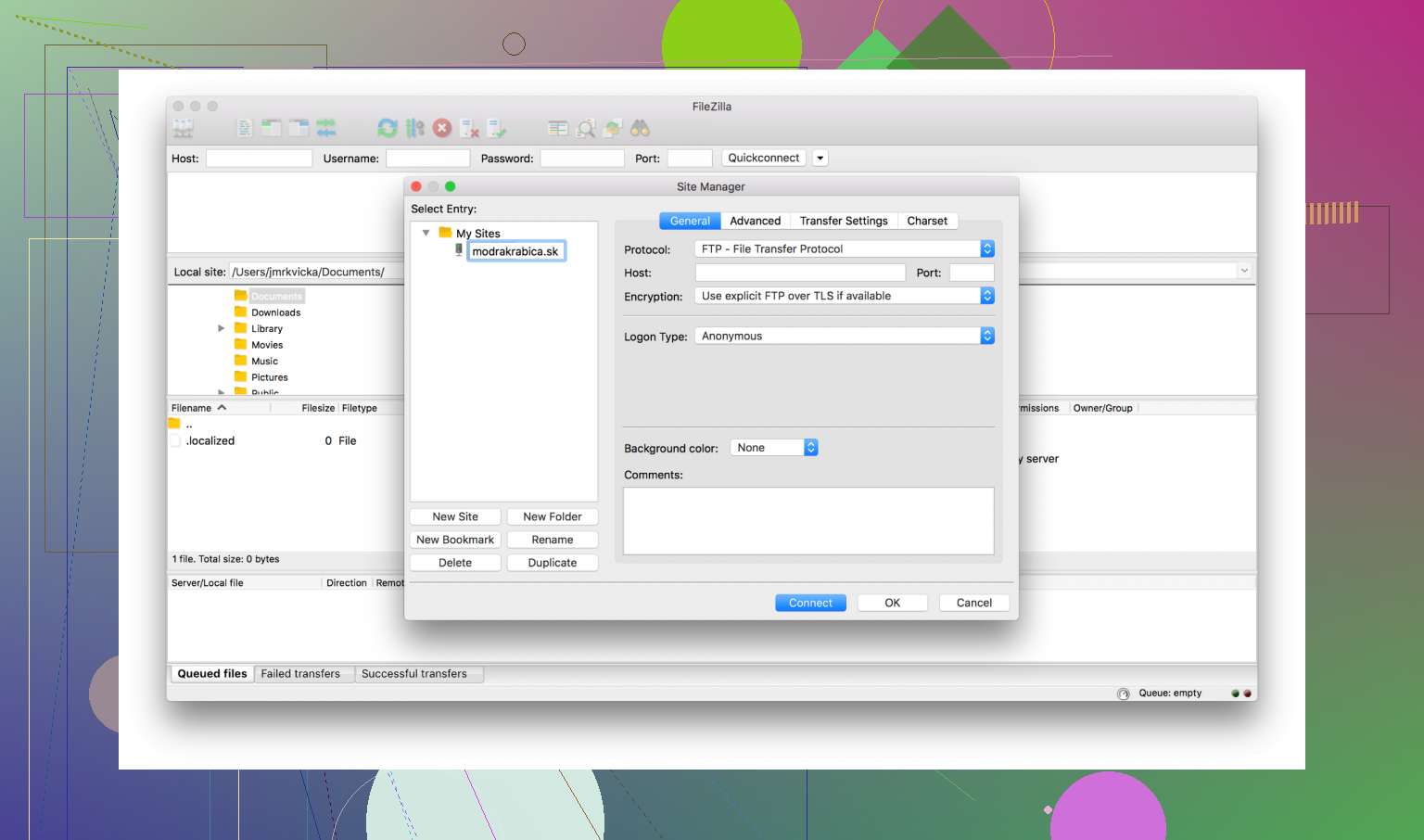
 Pros
Pros
- Cost: It’s free, which is a major draw for most users.
- Longevity: It has been around a long time and is well-known in the FTP space.
- Reliability: It works reliably for everyday, standard FTP tasks.
- Protocols: Supports multiple transfer protocols, including FTP, SFTP, and FTPS.
- Ease of Use: Features a drag-and-drop interface and a transfer queue for managing multiple operations at once.
 Cons
Cons
- Dated Interface: Compared to more modern alternatives, the design feels a bit old-fashioned.
- Slow Transfers: The application can sometimes be slow or hang. Some users report it freezing for about 20 seconds before timing out. This is often caused by server-side timeouts, unstable networks, or having too many simultaneous connections active at once.
 Tips & Recommendations
To keep things running smoothly, I’d suggest a few practical steps. First, always stick to the official site for downloads to avoid unwanted software. When connecting, try to prefer SFTP or FTPS over plain FTP. These options use SSH encryption, which is significantly more secure for protecting your data during transfer.
If you find that transfers are hanging or the app is freezing, try going into the settings and lowering the number of simultaneous connections. Sometimes the server gets overwhelmed if you try to move too many files at once. Also, check that your server timeout settings aren’t set too aggressively, as a small network hiccup can cause the client to drop the connection entirely.
Using Alternatives
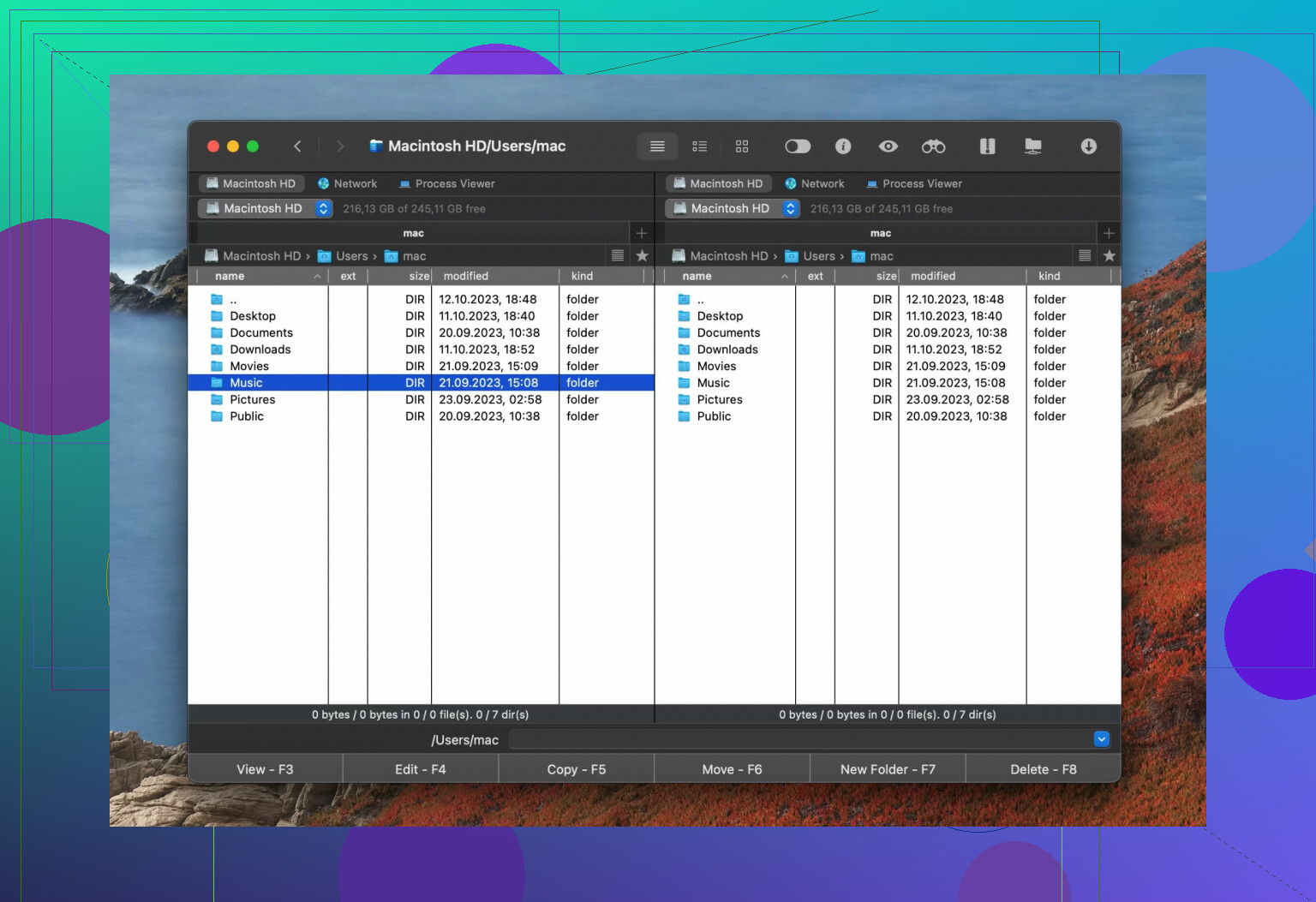
If you are on a Mac and want a different experience, Commander One is an alternative for SFTP. It connects to remote servers via FTP, SFTP, and FTPS and lets you organize operations in a queue, which helps when managing several servers simultaneously.
Beyond just FTP, it functions as a full file manager with features like file encryption, advanced search, a built-in Terminal emulator, and a process viewer. It also supports MTP, Android, and iOS devices, which makes it a practical option if you need to manage files across various devices from a single Mac.
23 Likes
Short answer for your exact worry. FileZilla is “safe enough” if you do a few things right. It is risky if you do them wrong.
I’ll keep this practical.
- Where you download it
This is the main risk, not the app itself.
Safe approach:
• Use only the official FileZilla site.
• Avoid download portals, “free software” hubs, and “optimized installer” sites.
• On Windows, avoid any installer that includes a “download manager” or “offer screen”. Close the tab and start over.
Extra step if you want to be picky:
• After download, upload the installer to VirusTotal and scan it. Takes 1 minute.
If anything flags it as adware or a wrapper, delete it.
- What got FileZilla its bad reputation
The core project is open source. That part is not malware.
The trouble came from:
• Bundled installers from ad networks.
• Third party mirrors repackaging the installer.
• People clicking big fake “Download” buttons on ad-heavy pages.
So your system gets junk toolbars or “PC cleaner” stuff, not because of FileZilla code, but because of the wrapper installer.
I disagree a bit with @mikeappsreviewer on one thing. On Windows the risk is higher than “some coworkers got adware once”. I have seen whole labs need cleanup because people grabbed FileZilla from random portals.
- How safe it is once installed
If you install a clean build:
• No known built-in malware.
• It respects OS permissions.
• It does not snoop outside the folders you give it.
• It does not open ports on its own.
Your bigger risk is bad protocol use and bad habits.
- How to use it without shooting your foot
Security tips that matter more than the installer once it is clean:
• Prefer SFTP over FTP or FTPS.
FTP sends passwords in clear text. On shared WiFi or office networks this is a problem.
• Use strong unique passwords for each server.
• Disable “Save password” if you are on a shared machine.
• Use key based auth for SFTP if your host supports SSH keys.
• Turn off “keep local directory listing in sync” if you tend to drag the wrong stuff. It reduces “oops I nuked a folder” moments.
- Hardening on Windows
If you are on Windows and worried about system mess:
• Create a system restore point before install.
• Run the installer with your normal user, not an admin account, unless it prompts and you trust the source.
• During install, read every page. Uncheck any “extra offer” or “recommended tool”. If you see those, you likely did not get the clean installer. Cancel and start again from the official site.
- macOS and Linux
On macOS and Linux, risk from bundled junk is lower in practice, but still do:
• Download from official site or your distro repos.
• On macOS, if Gatekeeper complains in a weird way or you see extra dialogs unrelated to “this is from the internet”, stop.
- If you hate the feel of FileZilla or want less risk
For macOS, Commander One is a strong alternative.
Why it fits your use case:
• Native style interface.
• SFTP, FTP, FTPS support for server management.
• Dual pane file manager, so remote and local management in one place.
• Available from the Mac App Store, so you avoid shady installers and adware bundles.
For many people on Mac, Commander One plus SSH in Terminal handles most site and server work cleaner than FileZilla.
- Practical recommendation based on your concern
If you want to keep risk low and still get the job done:
• If you are on Mac
Try Commander One first for your website and server management.
Keep FileZilla as a backup client if a guide or host doc assumes it.
• If you are on Windows and must use FileZilla
Only download from the official site.
Scan the installer with VirusTotal.
During install, abort if you see any bundled offer.
Then use SFTP, not FTP, for your servers.
If you follow those steps, the chance of messing up your system or leaking credentials stays low. The horror stories mostly come from bad installers and plain FTP, not from clean FileZilla used with SFTP.
Short version: FileZilla itself is generally safe, but the install path, defaults, and your workflow can absolutely bite you if you’re not paying attention.
Couple of points that @mikeappsreviewer and @ombrasilente already covered well, so I’ll not rehash the same “download from official site, use SFTP” checklist, though that advice is still solid.
Here’s where I slightly disagree / add nuance:
-
The installer reputation problem is not just “old news”
Some people say “oh, that was years ago, it’s fine now.” I wouldn’t be that relaxed. The pattern of bundling adware tends to come and go with revenue needs. So treat every FileZilla installer on Windows as potentially annoying until proven clean. On macOS and Linux it’s usually less of a circus, but I still don’t blindly trust any third‑party mirror. -
The bigger risk: how FileZilla stores your credentials
Everyone talks about adware, but the part that actually worries me for server work is this:
- FileZilla stores saved site passwords in plain text in an XML file.
- If malware or another user on the system grabs your user profile, those creds are just sitting there waiting to be harvested.
So if you care about your production servers:
- Do not save passwords permanently, or
- At least avoid storing sensitive root / sudo‑level accounts there
- Prefer SFTP with key‑based auth and keep the private key protected by a passphrase
If an attacker gets read access to your home directory, FileZilla’s site manager is basically a buffet.
- Protocol paranoia is justified
Everyone already told you to prefer SFTP, which is correct. I’ll just add:
- If your host only offers plain FTP in 2026, that’s a red flag about their general security posture. I’d start looking at the host itself, not just the client.
- For anything involving client data, logins, or private backups, I’d treat bare FTP as “for emergencies only” and rotate those passwords often.
- “Safe enough” also depends on what you’re transferring
You said “website and server management” which can mean anything from a static portfolio site to a multi‑tenant app with user data.
Rough mental model:
-
Static brochure site on cheap shared hosting
FileZilla from a clean installer + SFTP is fine. Even if something went wrong, the blast radius is small. -
Production app with real user data, compliance, company policy, etc.
I’d be more conservative. I’d favor:- SFTP with keys
- A client that doesn’t store passwords in plain text
- Possibly something with better logging and integration on your OS
- Ergonomics and long‑term use
This is where I’d echo the others but take it a bit further: if this becomes daily tooling rather than a one‑off:
- FileZilla is functional but dated, both visually and behavior‑wise.
- For people who live in macOS all day, the friction adds up.
In that case, I would seriously look at Commander One as your main FTP / SFTP client:
- Mac‑native UI and dual‑pane file manager feel a lot less clunky
- Handles FTP, FTPS, and SFTP for the same tasks you’d use FileZilla for
- Also handles local file management, Android / iOS devices, search, etc., so you’re not juggling three different tools
If you want an SEO‑friendly phrase to search further: “Commander One SFTP client for macOS” will give you plenty of comparisons and reviews. A lot of Mac users end up happier with that as their daily driver, then keep FileZilla around just for those “the tutorial only shows FileZilla screenshots” moments.
- When I personally would and wouldn’t use FileZilla
I would use FileZilla if:
- I’m on a throwaway VM or test machine
- I’m doing a quick one‑time upload to a low‑risk site
- I downloaded a clean installer and double‑checked what it’s installing
I wouldn’t lean on it heavily if:
- I manage multiple important servers long‑term
- I care about how credentials are stored on disk
- I’m already on macOS and can use something like Commander One that behaves better and fits the OS
So: you probably won’t “mess up your system” if you grab a clean FileZilla build and don’t click through every dialog like a zombie. The bigger danger is getting lazy, saving passwords everywhere, using plain FTP, and assuming “it’s fine because everyone uses FileZilla.” That’s the part to actually be paranoid about.