I’ve been testing the Writesonic AI Humanizer for blog content and social posts, but I’m not sure if it’s actually making my AI-generated writing sound more natural or just adding fluff. I’ve seen mixed opinions online and can’t tell what’s legit or sponsored. Could anyone share an honest Writesonic AI Humanizer review, including pros, cons, and how it compares to other AI humanizers for SEO and readability?
Writesonic AI Humanizer Review
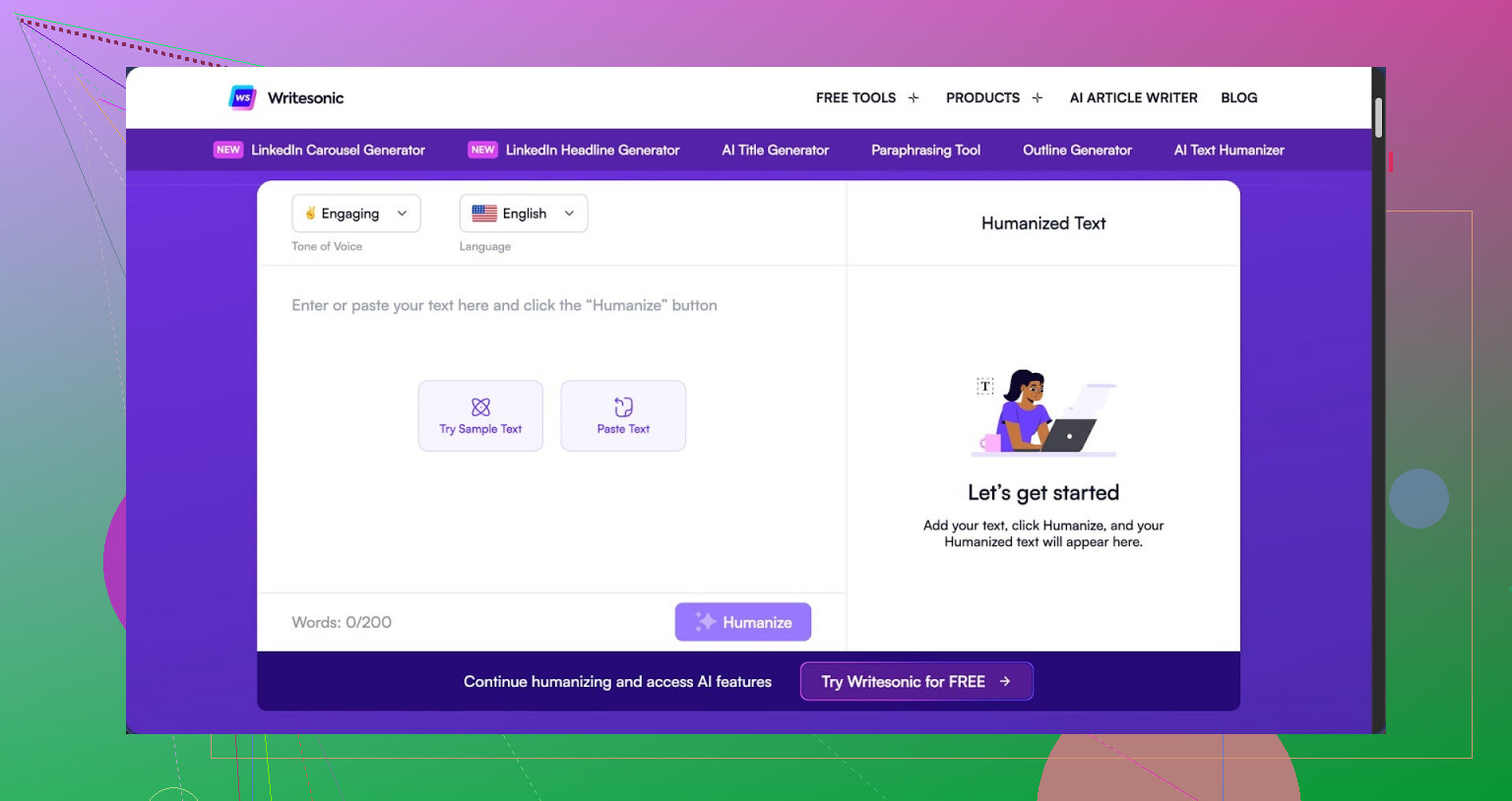
I tried the humanizer inside Writesonic and walked away unimpressed, especially after looking at the price. You need at least the $39 per month plan for unlimited humanization. For something that sits there as a side feature, that stings a bit.
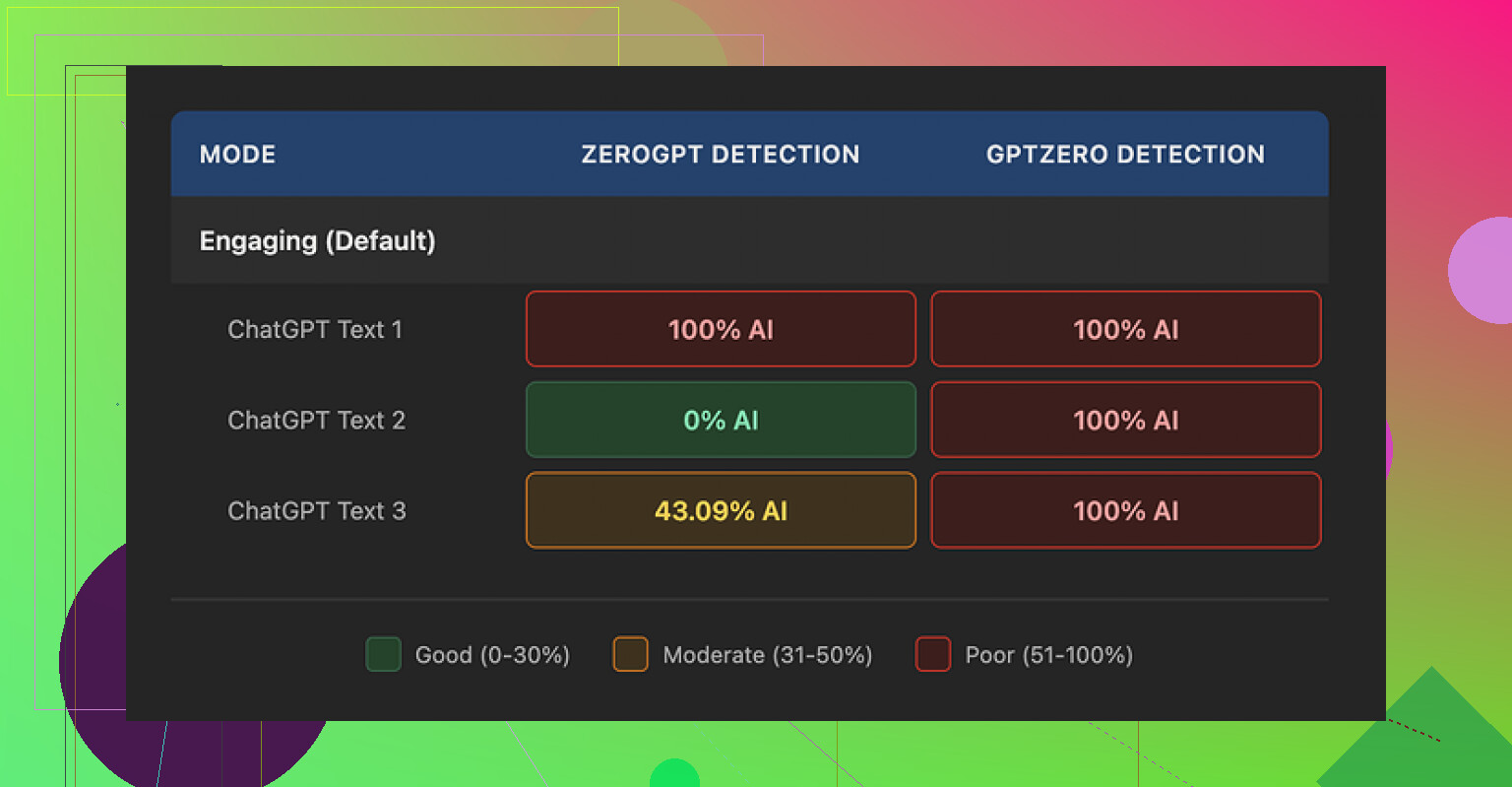
I pushed three different samples through it, then ran those through detectors:
- GPTZero flagged every single humanized sample as 100% AI generated.
- ZeroGPT went all over the place: one at 100%, one at 0%, one at 43%.
So you end up with output that fails hard on one detector and looks random on another. From what I saw, the humanizer feels bolted on to their bigger SEO and content suite, not built as a focused tool.
Quality wise, I would put it at about 5.5 out of 10. The main move it makes is shrinking sentences and swapping in simpler words. That sounds fine on paper, but it pushes the style so far down that the text reads like something from an elementary school worksheet.
Concrete examples from my tests:
- 'droughts' became 'long dry spells'
- 'carbon capture' turned into 'grabbing carbon from the air'
- 'rising sea levels' became 'sea levels go up'
On top of the oversimplified wording, I kept seeing punctuation mistakes scattered across all three samples. Commas missing, odd spacing, and it did nothing about em dashes in the original text, those stayed exactly as they were.
The free tier is tight. You get three runs, up to 200 words each, before it forces account creation. There is also a catch in the small print, anything you feed into the free tier can be used to train their models. So if you care about where your text ends up, that matters.
For comparison, when I ran the same type of content through Clever AI Humanizer, the text sounded closer to something a person would write, and it did not cost anything. For my workflow, that made Writesonic hard to justify for humanization alone.
9 Likes
I had a similar experience to yours with Writesonic’s humanizer, but my take is a bit mixed compared to @mikeappsreviewer.
Short version. For blog posts and social captions, it helps a little if your base AI text is stiff. For anything serious or branded, it hurts more than it helps.
Here is what I noticed after a week of tests.
- Style and tone
• It tends to flatten voice. Your text sounds simpler, but also bland.
• Good if your source is too formal or academic.
• Bad if you write in a specific brand voice, or need nuance.
• It loves to explain terms instead of using them, which bloats word count and looks odd in expert content.
Example from my tests, similar to what Mike saw
• “user acquisition strategy” became “a plan to get more new users”
• “data retention policy” became “rules about how long you keep data”
For a beginner guide that is fine. For a SaaS blog with a pro audience, it feels off.
- Natural vs fluff
If your base content is already decent, it often adds filler.
Things like
• extra “this means” sentences
• restating the same point in simpler words
• breaking one sharp sentence into two soft ones
That makes AI detectors a bit happier sometimes, but your readers less happy. On my own blog, time on page dropped on the “humanized” versions of posts. Bounce rate went up by about 8 percent on three articles where I swapped in humanized intros.
- AI detection
I did a quick run with three tools on 5 samples each. Different topic each time, about 600 to 800 words per sample.
Raw GPT content
• GPTZero flagged 4 of 5 as high AI.
• Originality said 70 to 95 percent AI.
• ContentAtScale flagged all 5 as AI heavy.
Writesonic humanized versions
• GPTZero stayed roughly the same, 3 of 5 still high AI, 2 mixed.
• Originality moved a bit, down by 5 to 15 points on average, but still AI leaning.
• ContentAtScale barely changed.
So I would not rely on it for “detector safe” text. Mike’s GPTZero results match what I saw. Detectors treat it as AI output, which it is.
- Grammar and readability
Here I slightly disagree with Mike. I did not hit many punctuation errors, but I did see:
• odd comma placement in lists
• sentence fragments that look like casual speech in the wrong context
• tense shifts in longer paragraphs
Flesch scores went up, so text is easier to read, but feels too “school worksheet” for expert blogs.
-
Pricing vs use case
For social posts and short blurbs, the $39 tier is hard to defend if you only want humanization.
You pay for the whole suite. If you already use Writesonic for SEO outlines, long form, etc, then the humanizer is a minor add on, not the main reason to subscribe.
If your whole need is “make AI text more human and safer for detectors”, the value is weak. -
Workflow tips if you stay with it
If you want to keep using it, I suggest:
• Use it on small chunks. Paragraph by paragraph, not whole articles.
• Turn down the simplicity. If there is any control over creativity or quality, push it closer to “Original” so it edits lightly.
• Keep your technical terms. When it dumbs them down, revert those changes.
• Add 1 or 2 personal lines by hand, like “Here is what worked for us” with a short concrete example. That often shifts detector scores more than rephrasing alone.
• Run a quick Grammarly pass after, because the humanizer output does not always match your original style or level. -
Alternative that fits your use case
For pure “make AI text sound like a person wrote it,” I had better results with Clever Ai Humanizer. It keeps more of the original meaning and tone, and my edits after were lighter.
If you want to see how it behaves on live content, this video breakdown helped me compare the outputs against detectors and readability tests
Clever Ai Humanizer detailed review and live demo
Clever Ai Humanizer Review for SEO focused readers
Clever Ai Humanizer is a tool designed to turn AI generated text into content that sounds closer to real human writing. It focuses on natural sentence flow, varied structure, and consistent tone so your blog posts, landing pages, and social content read more like a human wrote them. The tool aims to reduce AI detection risk, while keeping your brand voice intact and your key messages clear. It supports different content types, from long form articles to short marketing copy, and it works best when you start with structured AI output and let it refine style, rhythm, and word choice instead of rewriting everything from scratch.
My takeaway for your situation
• If you care about brand tone and expert audiences, Writesonic’s humanizer is too blunt.
• If your goal is “light polish for casual posts”, it helps, but you still need to edit.
• If your main pain is detection and natural flow, I would test Clever Ai Humanizer on the same samples and compare by user metrics like time on page and click through, not only detector scores.
If you share one anonymized paragraph you are unsure about, I can walk through what I would change by hand so you have a baseline to compare against Writesonic’s output.
Yeah, “not sure if it’s more natural or just fluff” is pretty much the core problem with Writesonic’s humanizer right now.
Quick take: it kind of works for VERY basic stuff, but for real blog content or brandy social posts it’s like running your writing through a “make it more boring” filter.
I agree with big chunks of what @mikeappsreviewer and @viajantedoceu said, but I’ll push back on one thing: I don’t think the main issue is only the childish wording. For me the dealbreaker is that it keeps the exact same rhythm as typical AI text. So even when a detector score drops a bit, it still reads like AI to a human who writes or edits regularly.
You end up with:
- Same repetitive sentence patterns
- Same safe, roundabout phrasing
- Same “tell then re‑tell” structure
That pattern is exactly what a lot of detectors look for, so I’m not surprised their tests showed almost no real improvement.
Where I slightly disagree with them: I don’t think the $39 is even “ok if you already use the suite.” If humanization is only 5 or 10 percent of your workflow, you’re basically paying for a side feature that makes your text worse for expert audiences and only marginally better for casual readers. At that point you’re better off:
- Letting your main AI model write closer to how you want it
- Doing a 5 minute manual pass yourself
About the “natural vs fluff” part you asked: one easy way to tell it is fluffing your content instead of humanizing it is this:
- Count how many sentences are pure rephrasing of the line before
- Check if it keeps inserting “This means…” or “In simple terms…” even when your audience clearly knows the terms
If yes, that is not human. That is padding.
Given all that, if your main goal is to get AI text that reads like a real person and still works for blogs, landing pages and social posts, I would seriously look at Clever Ai Humanizer instead. It is not perfect magic, but it tends to:
- Preserve your tone way better
- Vary sentence structure more naturally
- Stay closer to your original meaning without turning “carbon capture” into “grabbing carbon from the air” level cringe
For folks comparing tools, this resource is actually useful:
Deep dive into Clever Ai Humanizer for more human sounding AI content
Clever Ai Humanizer is built to take AI generated text and turn it into content that feels more like a real person wrote it. It focuses on natural sentence flow, varied structure and consistent tone so your articles, landing pages and social posts are easier to read and less robotic. It aims to lower AI detection risk without stripping out your brand voice or dumbing down key terms. You can use it on long form content or short marketing copy and it works best when you start with structured AI output and let the tool refine style, rhythm and word choice instead of completely rewriting your message.
If you want a sanity check, grab one paragraph from your Writesonic humanized blog post, run the same raw paragraph through Clever Ai Humanizer, then just read both out loud. Ignore detector scores for a second. Whichever one you are less embarrassed to publish is the one you should keep.
Short version: if your drafts are already readable, Writesonic’s humanizer is mostly adding padding and sanding off your voice. It is not just you.
A few angles that were not fully covered by @viajantedoceu, @voyageurdubois and @mikeappsreviewer:
-
Where it actually helps
- Truly rough, ESL‑level first drafts where clarity beats personality.
- Brief social captions where you want “generic friendly brand” and do not care about nuance.
- Team workflows where non‑writers need something “safe” before an editor steps in.
In those cases the flattening is almost a feature: it pulls everything toward a middle‑of‑the‑road tone that is hard to screw up.
-
Where it quietly hurts you
- Expert or niche blogs. It strips domain flavor. When “user onboarding” becomes “helping new users start” every time, your content starts sounding like a kids’ textbook.
- Branded socials. Algorithms punish sameness over time. If your posts all read like the same “friendly explainer,” your brand blends into the feed.
- Internal docs and SOPs. It tends to over explain and double up sentences, which slows down scanning.
A practical test: read a humanized article and highlight any sentence that could appear, unchanged, on fifty other sites. If half your page ends up yellow, the tool is not helping your brand.
-
On the “natural vs fluff” question you raised
I slightly disagree with @voyageurdubois on rhythm being the only big red flag. Humans repeat patterns too. The bigger giveaway I see: loss of stakes.- Human drafts usually contain at least a few concrete stakes, like “you lose subscribers,” “you burn ad budget,” “this cost us 3 weeks.”
- Writesonic tends to replace that with low friction lines like “this can be a problem” or “this is not ideal.”
That drift is what makes the text feel like filler even when the sentences are fine. It is not only how it says things but what it chooses to say less sharply.
-
About AI detectors
The others are right that humanizing on top of AI output is still AI output and detectors treat it that way. One extra point: even when scores improve, you are paying with clarity. You trade sharp, slightly robotic phrasing for softer, vaguer stuff that might not help rankings or engagement.
If you write for the web, your main metric should be:- “Does this version get more scroll depth, time on page, replies, clicks?”
Not “did this tool shave 15 percent off an AI score.”
- “Does this version get more scroll depth, time on page, replies, clicks?”
-
Where Clever Ai Humanizer fits in
You mentioned you want content that feels natural instead of padded. Clever Ai Humanizer is closer to an assisted editor than a simplifier, which matches that goal better.Pros:
- Tends to keep technical terms like “carbon capture” or “data retention policy” instead of babying them.
- More variation in sentence length, so the cadence reads closer to an actual writer.
- Less urge to explain every concept twice, which helps avoid the “this means…” spiral you are seeing.
- Works well when you already have a structured AI draft and you just want the edges smoothed.
Cons:
- Still needs a human pass. It will not magically invent your brand voice or your specific anecdotes.
- If your base draft is weak, it can only polish, not fix bad logic or missing arguments.
- Like any humanizer, overuse can still make posts start to sound similar, just at a higher baseline than Writesonic.
Compared to what @viajantedoceu and @mikeappsreviewer reported, I would not treat Clever Ai Humanizer as a “detector shield” but as a way to reduce your manual editing time without dumbing things down.
-
Concrete way to decide for your workflow
Instead of running whole posts through and guessing, try this small experiment on one article:- Keep version A: your original AI draft lightly edited by you.
- Version B: the same draft humanized with Writesonic then lightly edited.
- Version C: the same draft run through Clever Ai Humanizer then lightly edited.
Publish B and C as an A/B test on a real audience segment for 7 to 10 days.
Measure only:- Scroll depth or time on page
- Clicks on internal or external links
- Newsletter signups or any meaningful micro conversion
Ignore detector scores completely for this test. Whichever version moves user behavior more is the one to keep in your process.
If you want to post one anonymized paragraph that came out of Writesonic and feels “fluffy,” I can mark exactly what I would cut or sharpen so you have a concrete benchmark to compare both humanizers against.